2 Understand a project before running it
Someone sends you a folder called reading-log. There is code inside, so you look for a Run button. That is a reasonable impulse. But two minutes spent looking at the folder can save an hour of guessing what happened afterward.
This lesson needs no terminal experience. You should know that a program can read a file and produce output. By the end, you will be able to draw a small map of a project and say what you still need to check before running it.
2.1 Give the files a job
Imagine this folder. The names are examples; a real project may use different ones.
The README is a text document intended to explain the project. report.py contains Python source code. books.csv contains data arranged in rows and columns. requirements.txt may list Python dependencies, and .gitignore tells Git which untracked files to leave out by default.
These are clues, not guarantees. A README can be outdated. A program named report.py can still write files or contact a server. The extension tells you something about how a file is normally used; the contents tell you what this particular file does.
Open the README first, then inspect the command it recommends and the file that command starts. That starting file is an entry point. Larger projects can have several: a web server, a command-line tool, and a test runner might each start differently.
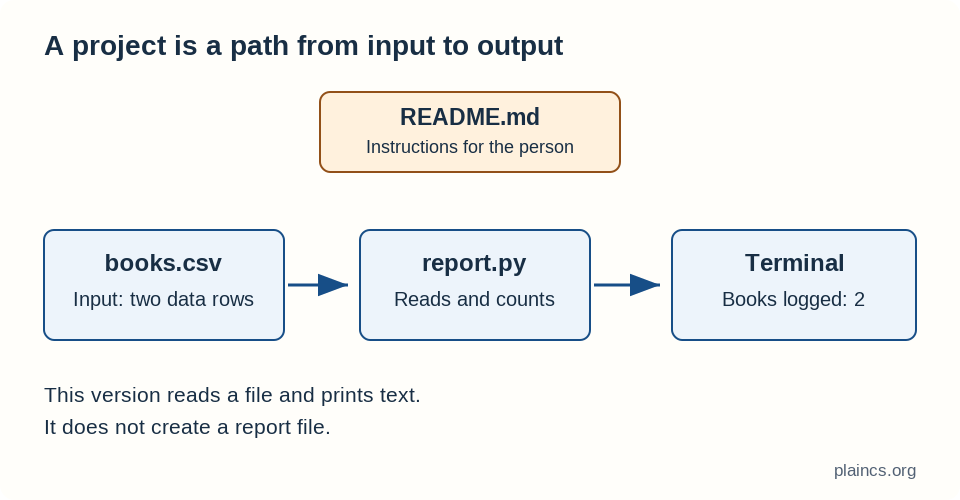
The useful question is where information goes. Instructions guide the person; data flows through the program.
2.2 Trace one complete run
Suppose the README says to run python report.py. Open report.py and find this:
csv and pathlib come with Python. The program builds a path to books.csv, opens it for reading, interprets its rows, and prints their count. The with block closes the file when the block ends, including when an error interrupts it.
__file__ identifies this source file. Building the input path from it makes the data location independent of the terminal’s current folder. This is one design choice, not a rule for every program; some tools intentionally accept paths relative to the folder where you run them.
For this tiny source, the visible operations read one local file and print to the terminal. We do not see a file write or a network request. That observation applies to this example, not to every Python program or every file called report.py.
With a books.csv containing the following text, the expected count is two:
The first line supplies column names. It is not counted as a book. Each remaining row becomes a dictionary, a mapping from a column name to its value.
This output tells us that two rows were read. It does not establish that every row is a valid book. The program has no check for missing titles, duplicate records, or unexpected status values. A program can run successfully and still need better validation.
2.3 Read instructions as claims you can check
A useful README identifies the required runtime, the setup steps, the command to start, and the expected result. It should also explain configuration and important side effects. If it says “run the setup script,” inspect that script before treating it as a harmless preparation step.
Dependencies deserve the same care. An empty requirements.txt does not prove a program is safe. A nonempty one does not mean it is dangerous. It tells you that setup has another part to understand: code outside the project may be required.
When instructions and source disagree, record the disagreement. You might discover that the README names an old entry point. Guessing a replacement command may get something running, but it leaves the next reader with the same problem.
For an unfamiliar project, write down four things:
- Start: which command and file begin the work?
- Input: which files, arguments, or services supply information?
- Output: what is printed, written, or sent elsewhere?
- Setup: which runtime, dependencies, and settings are required?
If one answer is unknown, write “unknown.” A useful project map distinguishes what you inspected from what you assumed.
2.4 Try it: predict before you run
Create a new practice folder named cs-essentials-lab, with a reading-log folder inside it. Using your editor, save the Python example as report.py and the CSV example as books.csv in reading-log. You do not need to execute them yet.
Write a short README that states the input filename, expected output, and whether the example writes a report file. Then predict what happens if books.csv is renamed without changing the source.
Check your reasoning
The input is books.csv beside report.py. The expected output is Books logged: 2 in the terminal. This version does not create a report file; its output is printed.
Renaming the CSV breaks the path the program constructs. Python should report a file-not-found error when it tries to open it. The program will not reach the final print statement. Installing another package would not repair a missing input file.
You are ready to move on when you can explain this example’s input-to-output path without running it. The terminal lesson will show how to ask the computer to run a command in the place you intend.
For the language details, see Python’s official references for CSV files and filesystem paths.