4 Give each Python project its own environment
You install a package, run the program again, and get the same missing-package error. The installation may have succeeded. It may simply have installed the package for a different Python interpreter.
This lesson assumes you can open a terminal and navigate to a folder. You also need an installed Python 3 runtime. It does not cover installing Python; use its official platform instructions if the version commands below fail.
4.1 There is more than one thing to choose
The interpreter is the executable that runs Python code. A package supplies code that a program can import. A virtual environment gives a project its own interpreter entry points and package installation area, built from an existing Python installation.
An editor can select one interpreter while a terminal starts another. That is why “Python is installed” is not enough information to explain a project’s setup.
For Windows PowerShell, check whether the Python launcher is available:
On macOS/Linux, the usual starting check is:
The installed version varies. A real project may require a specific supported version, so compare the output with its documentation. If your Windows installation provides python but not py, confirm python --version identifies the intended Python 3 runtime before substituting it in the creation command below.
4.2 Put a boundary around the project
Open your own reading-log practice folder in the terminal. The next command creates a .venv subfolder there. If one already exists, stop and inspect its purpose instead of overwriting a setup you rely on.
Windows PowerShell:
macOS/Linux, Bash or Zsh:
The first command creates the environment. The second runs its Python directly and prints the executable path. That path should be inside this project’s .venv; the full path depends on where you created your folder.
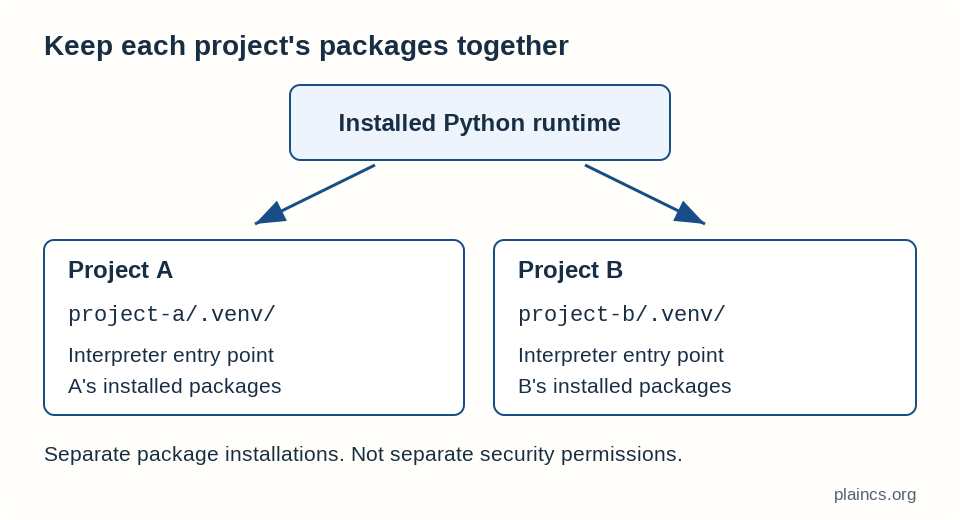
Keeping package installations separate lets projects require different versions without sharing one installation area. A virtual environment is not a security sandbox: code you run can still access resources allowed to your user account.
You may have seen an activation command in other tutorials. Activation changes your shell’s command lookup so a short command such as python points to the environment. Calling the executable directly also works, and avoids needing to change PowerShell script-execution settings for this exercise.
4.3 Ask the same Python to manage its packages
Inside the Windows example, inspect pip this way:
The -m option asks that Python to run a module. Using python -m pip ties the package manager to a specific interpreter, rather than trusting that a separate pip command selects the one you intended.
For macOS/Linux, use ./.venv/bin/python -m pip --version. We are inspecting pip, not installing anything. Some systems package virtual-environment support separately; if creation fails, follow your Python distribution’s instructions instead of using administrator privileges as a general repair.
Now run the reading-log program using the explicit environment interpreter. On Windows:
On macOS/Linux:
For the two-row CSV in the project lesson, expect Books logged: 2. That program imports only standard-library modules, so it needs no third-party package installation. Do not try to install a package named csv to make it work.
4.4 What belongs in the handoff
Do not treat the .venv directory as the portable project. It contains machine-specific paths and generated environment files. Another person should create an environment from a compatible Python installation and the project’s dependency instructions.
A dependency manifest records what the project needs. A lockfile records resolved dependency details in an ecosystem-specific format. Some formats overlap these roles: a requirements.txt may contain broad constraints or exact versions. The filename alone does not guarantee reproducibility.
Record the Python version requirement, setup commands, and dependency records. Do not blindly replace a project’s existing dependency system with a different one. Python, JavaScript, and Java projects have different conventions even though the underlying problem is similar.
4.5 Try it: diagnose the wrong interpreter
An editor says it is using project-a/.venv, but a terminal error reports a package is missing. Someone suggests installing that package globally. What should you inspect first?
Check your reasoning
Find which interpreter the terminal actually runs. Ask it to print sys.executable, then compare that path with the editor’s interpreter setting. Inspect pip through that same executable.
Only after confirming the intended environment should you compare installed packages with the project’s declared dependencies. Installing globally may affect a different interpreter and leave the original problem untouched.
Finish by recording your environment interpreter’s path and the command that runs report.py. You should be able to explain why those commands belong together. The Git lesson will distinguish the source worth recording from generated local files.
Official sources: Python’s virtual-environment tutorial, venv reference, and pip’s user guide.