Developing an AI system requires more than writing a training script. You must be able to explore data, keep track of code changes, reproduce experiments, and connect your program to other software. Git, Jupyter, and application programming interfaces (APIs) address different parts of that work.
- Git records changes to source files and supports collaboration.
- Jupyter notebooks combine executable code, explanations, and outputs for interactive exploration.
- APIs define how programs exchange requests and responses.
These tools complement, rather than replace, core programming skills. This article assumes basic familiarity with Python for Artificial Intelligence and Data Analysis with Pandas and SQL.
First intuition: one small project, three different jobs
Imagine building a program that predicts apartment rent. You explore prices and draw graphs in Jupyter; you commit your code to Git so changes can be reviewed and reversed; and you expose the finished model through an API so a website can ask for a prediction.
| Question | Tool | What it does |
|---|---|---|
| “What patterns appear in this dataset?” | Jupyter | Runs exploratory code alongside notes and charts |
| “What changed since yesterday?” | Git | Tracks versions of code and related text files |
| “How does my website request a prediction?” | API | Provides an agreed interface between programs |
These tools solve different problems. A notebook does not automatically version an experiment, Git does not serve predictions, and an API does not train a model by itself. The following sections show where each belongs in a responsible AI workflow.
1. Where these tools fit in AI development
A typical AI project has both an experimental workflow and a software delivery workflow. The same code may begin as a small investigation in a notebook, evolve into tested Python modules, and ultimately run behind an API.
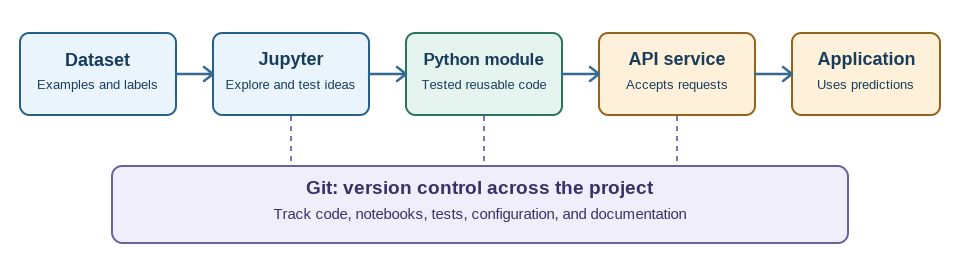
This diagram shows one useful workflow, not a mandatory sequence. A small AI application can call an existing model’s API without training anything, while a research project might stay in notebooks for most of its lifetime.
2. Git: version control for AI projects
Version control is the practice of recording and managing changes to files over time. Git is a distributed version control system: each normal clone contains a local repository with its own history, so developers can record changes without continuously contacting a central server.
A repository holds project files and their tracked history. A commit is a recorded snapshot of selected changes. A branch identifies a line of development. A remote is another repository used to exchange changes, such as one hosted on GitHub or GitLab. Git itself is distinct from these hosting services.
Essential Git concepts
| Concept | Meaning | Practical purpose |
|---|---|---|
| Working tree | Files currently present for editing | Write and modify code |
| Staging area (index) | Changes selected for the next commit | Decide what to record |
| Commit | Recorded project state with metadata and history links | Preserve a meaningful change |
| Branch | Movable name referring to a commit | Develop features separately |
| Merge | Combine histories or changes from branches | Integrate work |
| Remote | Named connection to another repository | Share and synchronize work |
.gitignore | Patterns for intentionally untracked files | Avoid accidental additions of temporary files |
A small Git workflow
Run these commands in a terminal from a new project directory:
mkdir ai-study-project
cd ai-study-project
git init

git status
git add README.md
git commit -m "Document project objectives"
Create README.md before running git add. Git also needs your commit author identity configured, either globally or for this repository:
git config user.name "Example Developer"
git config user.email "[email protected]"
A common feature workflow is:
git switch -c feature/data-validation
# Edit project files and run tests.
git status
git add src/data_validation.py tests/test_data_validation.py
git commit -m "Add dataset validation"
git switch main
git merge feature/data-validation
This assumes main exists and the named files have been created. In a shared project, use your team’s review process before merging, rather than assuming direct merges into the main branch are permitted.
What should Git track in an AI project?
Generally useful tracked files include source code, tests, documentation, small reproducible examples, dependency manifests, and non-secret configuration templates. Many teams also track small, non-sensitive notebooks when outputs are controlled.
Large datasets and model weights require special consideration. Git is optimized for file history, not for frequent changes to very large binary artifacts. Use appropriate data or artifact storage, and record the identifiers or versions needed to reproduce an experiment. Tools such as Git LFS or specialized data-versioning systems can help when the project requires them.
A basic .gitignore may contain:
.venv/
__pycache__/
.ipynb_checkpoints/
.env
*.pyc
Important: .gitignore does not remove a secret from commits where it was already tracked. If a credential is exposed, revoke or rotate it and follow the repository’s incident-handling procedure. Removing the local file is not enough.
3. Jupyter: interactive computational notebooks
A Jupyter notebook is a document made of cells, including executable code and explanatory Markdown. A notebook front end communicates with a kernel that executes code and maintains the state of the programming session.
This makes notebooks useful for dataset exploration, charts, mathematical experiments, model prototypes, and teaching. For example, the following cells can inspect a tiny dataset:
scores = [68, 82, 91, 74, 85]
mean_score = sum(scores) / len(scores)
print(f"Mean score: {mean_score:.1f}")
above_mean = [score for score in scores if score > mean_score]
print("Scores above the mean:", above_mean)Output:
Mean score: 80.0
Scores above the mean: [82, 91, 85]
The notebook lets you change inputs, rerun calculations, and explain why a result matters alongside the code.
The hidden-state problem
Notebook execution order is not necessarily the same as cell order. Consider this sequence:
# Cell A
learning_rate = 0.1
# Cell B
print(learning_rate)If you later change Cell A to learning_rate = 0.01 but execute only Cell B, the output may still reflect the previous in-memory value. Conversely, running Cell B before Cell A in a fresh kernel may raise NameError.
For reproducible notebooks:
- Put required imports, configuration, and data-loading steps in clear locations.
- Run the notebook from a fresh kernel in top-to-bottom order.
- Set random seeds when useful, while recognizing that seeds alone do not guarantee identical results across all hardware and libraries.
- Document data sources and package versions.
- Move stable logic into testable Python functions or modules.
- Review outputs before committing, particularly outputs that might contain private records or credentials.
Notebooks versus Python scripts
| Notebook | Python module or script |
|---|---|
| Excellent for interactive exploration and teaching | Better for reusable components and repeatable automation |
| Combines prose, code, and results | Separates program logic from its presentation |
| Can depend on execution history | Normally starts with fresh process state |
| Code review can be harder when outputs change | Text diffs are usually simpler |
Neither format is inherently more accurate. Use notebooks for exploration and scripts or modules where reliability, testing, automation, or reuse are more important.
4. Python environments and dependencies
Two projects can require different versions of the same library. A virtual environment isolates a project’s Python interpreter context and installed packages from many other projects on the machine.
Create and use one with the Python standard library:
python -m venv .venvOn macOS or Linux:
source .venv/bin/activate
python -m pip install numpy pandas jupyterlab
On Windows PowerShell:
.venv\Scripts\Activate.ps1
python -m pip install numpy pandas jupyterlab
Then start JupyterLab:
jupyter labPackage installation needs an internet connection or an available local package source. A virtual environment does not automatically solve dependency conflicts, lock exact versions, or make operating-system dependencies identical. Teams should record a suitable dependency specification and, for stricter reproducibility, use a lockfile or equivalent environment-management process.
Inside a notebook, confirm that the selected kernel uses the intended environment. Installing a package into one Python interpreter will not help a notebook running another.
5. APIs: connecting AI software to other systems
An application programming interface (API) is a defined way for one software component to interact with another. APIs are broader than web services: a Python library also exposes an API. In deployed AI applications, the term often refers to an HTTP API that receives requests and returns predictions, embeddings, generated text, or status information.
A typical HTTP request involves:
- An endpoint, such as
/predict, identifying the operation or resource. - An HTTP method, such as
GETorPOST. - Headers, which can describe content type and carry authentication credentials.
- An optional request body, often serialized as JSON.
The server sends an HTTP status code and may return a JSON response body. A successful status indicates that the HTTP operation succeeded under the service’s rules, not necessarily that an AI prediction is factually correct.
Example request and response
A hypothetical classification service might accept:
POST /predict HTTP/1.1
Host: example.test
Content-Type: application/json

{"text": "Free prize, claim it today"}
And respond:
{
  "label": "spam",
  "score": 0.93,
  "model_version": "classifier-v2"
}
The URL and response are illustrative, not a live service or a claim about any model. The meaning of score must be documented: it could be a probability estimate, a similarity measure, or an uncalibrated confidence-like quantity.
A working API example with Python’s standard library
The example below runs a small local HTTP server without a trained model. It demonstrates request validation and JSON transport, not machine learning. Save it as server.py:
import json
from http.server import BaseHTTPRequestHandler, HTTPServer


class Handler(BaseHTTPRequestHandler):
    def do_POST(self):
        if self.path != "/predict":
            return self.reply(404, {"error": "Not found"})

        try:
            length = int(self.headers.get("Content-Length", "0"))
            if length <= 0 or length > 10_000:
                return self.reply(413, {"error": "Invalid body size"})

            body = self.rfile.read(length)
            payload = json.loads(body)
            text = payload["text"]
            if not isinstance(text, str) or not text.strip():
                raise ValueError("text must be a nonempty string")
        except (ValueError, KeyError, TypeError, json.JSONDecodeError):
            return self.reply(400, {"error": "Invalid JSON input"})

        # Demonstration rule, NOT a trained classifier.
        label = "spam" if "prize" in text.lower() else "not_spam"
        self.reply(200, {"label": label, "method": "keyword_rule"})

    def reply(self, status, payload):
        encoded = json.dumps(payload).encode("utf-8")
        self.send_response(status)
        self.send_header("Content-Type", "application/json; charset=utf-8")
        self.send_header("Content-Length", str(len(encoded)))
        self.end_headers()
        self.wfile.write(encoded)


if __name__ == "__main__":
    # Bind locally for learning; do not expose this example publicly.
    HTTPServer(("127.0.0.1", 8000), Handler).serve_forever()
Run the server in one terminal:
python server.pyIn another terminal, make a request:
curl -X POST http://127.0.0.1:8000/predict \
  -H "Content-Type: application/json" \
  -d '{"text":"Claim your prize"}'
Expected response:
{"label": "spam", "method": "keyword_rule"}The server deliberately uses a deterministic keyword rule so the networking behavior is easy to understand. A real model-backed service would preprocess the input, run inference, interpret the result, and return a documented response. The built-in server used here is not production-ready: it omits authentication, robust security controls, concurrency management, observability, and other essential service features.
Calling an existing model API
When consuming an externally hosted AI model, the general pattern is:
- Read the provider’s API documentation and authentication requirements.
- Send only data you are authorized to share.
- Authenticate using a secret stored outside source code.
- Send inputs in the documented schema and specify appropriate limits.
- Handle success, validation failures, rate limits, timeouts, and server errors.
- Validate the returned structure before using it in an application.
- Measure latency, cost, and output quality with representative tests.
Do not treat generated text as trusted program instructions or assume a structurally valid JSON response is necessarily correct.
6. HTTP behavior that matters in AI integrations
| Status or issue | What it generally means | Recommended response |
|---|---|---|
200 OK | Request succeeded | Validate and use the returned data |
400 Bad Request | Invalid request | Fix the client input or schema |
401 Unauthorized | Missing or invalid authentication | Check configured credentials |
403 Forbidden | Access denied | Check permissions; do not bypass controls |
404 Not Found | Endpoint or resource unavailable | Verify the documented path |
429 Too Many Requests | Rate limit reached | Respect the service’s retry guidance |
500 or 503 | Server failure or temporary unavailability | Retry cautiously if safe and appropriate |
| Timeout | Response did not arrive in time | Set timeouts and handle uncertain outcomes |
Retries require care. Repeating a read-only request may be harmless, but repeating an operation with side effects can duplicate a payment, create multiple jobs, or perform the same action twice. Use idempotency guarantees or request identifiers when supported by the service.
7. A reproducible AI project structure
A small project might use this layout:
ai-study-project/
├── README.md
├── .gitignore
├── requirements.txt
├── notebooks/
│   └── exploration.ipynb
├── src/
│   └── data_validation.py
├── tests/
│   └── test_data_validation.py
└── data/
    └── README.md
The data/README.md can explain where authorized datasets come from and how to obtain them without committing the actual data. For larger projects, it may be useful to add configuration files, model artifact references, experiment tracking, and deployment manifests.
A practical development cycle looks like this:
- Define the question. Identify inputs, outputs, constraints, and evaluation criteria.
- Explore in Jupyter. Inspect data and prototype transformations.
- Extract reusable code. Move stable processing and inference logic to Python modules.
- Add tests. Verify expected behavior and failure cases.
- Commit with Git. Record code and configuration changes with meaningful descriptions.
- Expose an API if needed. Define inputs, outputs, validation, and authentication.
- Run an end-to-end test. Check that the consuming application receives the expected result.
- Track versions. Record relevant data, code, dependency, and model versions.
The project becomes reproducible when another developer can obtain the required permitted inputs, set up the environment, and rerun the documented procedure with reasonably consistent results. Merely committing source code does not ensure that outcome.
8. Security and reliability fundamentals
AI development tools also create common failure points:
- Credentials in Git: Never hard-code API keys, tokens, or passwords; use secret-management mechanisms appropriate to the environment.
- Sensitive notebook outputs: A notebook may save displayed datasets, logs, or tokens inside its
.ipynbfile. Inspect outputs before sharing. - Untrusted notebooks: Opening a notebook to read it differs from executing its cells. Run code only from sources you trust and understand.
- Unsafe network exposure: A development server bound to a public network interface may expose private endpoints. Keep learning examples local.
- Unvalidated API inputs: Enforce types, size limits, and authorization checks. Production systems need more than JSON parsing.
- Dependency risk: Pin or lock versions when reproducibility demands it, and update dependencies after reviewing security and compatibility.
- Irreproducible experiments: Track seeds where relevant, dataset definitions, preprocessing choices, metrics, and model versions.
- Confusing transport success with model quality: A functioning API can still serve a biased, inaccurate, or outdated model.
These safeguards are part of software engineering, not optional additions reserved for advanced AI systems.
9. Common misconceptions
“GitHub and Git are the same thing.” Git is the version control system; GitHub is one service that hosts Git repositories and collaboration features.
“A notebook always runs from top to bottom.” Cells can execute in any order; the kernel can retain old values, creating hidden dependencies.
“Saving the notebook reproduces the experiment.” Reproduction also depends on data, packages, environment, model artifacts, and sometimes hardware or nondeterministic computations.
“An API means an AI model.” An API is an interface. It may expose a trained model, an ordinary program, a database, or a combination of services.
“A 200 response proves the prediction is right.” An HTTP success status reports request handling, not the truth or safety of a model output.
“All datasets and model files belong in Git.” Large or sensitive artifacts often need separate storage, governance, and versioning.
Check your understanding
- How does Git differ from GitHub?
- What is the difference between a Git commit and a branch?
- Why might a notebook work during exploration but fail after restarting the kernel?
- What problem does a Python virtual environment solve, and what does it not solve?
- How are an HTTP API and the machine-learning model behind it different?
- Why should a client set a timeout and validate API responses?
- What additional information is needed to reproduce a model experiment beyond its source code?
Show worked answers
- Git manages version history locally and across repositories; GitHub hosts repositories and offers collaboration tools.
- A commit records a state in project history; a branch is a movable reference used to organize development.
- Later cells might depend on variables or side effects created in a different execution order.
- It isolates packages and interpreter context for a project, but does not guarantee exact package versions, operating-system compatibility, or identical results.
- The API defines communication and contracts; the model, when present, performs the prediction or generation.
- Timeouts prevent indefinite waits, and validation catches malformed, incomplete, or semantically unsuitable responses.
- Relevant data versions, dependencies, configuration, preprocessing, model artifacts, randomization settings, and evaluation procedure must also be documented.
Related concepts
- AI Knowledge Map shows where development tooling fits in the complete AI curriculum.
- Python for Artificial Intelligence introduces the language used for notebooks, scripts, and many AI services.
- NumPy, Arrays, and Tensors explains common numerical structures used in AI experiments.
- Data Analysis with Pandas and SQL covers preparing tabular datasets.
- Data Types and Data Collection for AI continues with dataset sources and collection decisions.
- Integrating AI Models with APIs develops model-backed API integration in more detail.
- The Machine Learning Lifecycle and MLOps expands reproducibility, versioning, and deployment practices.
References and further reading
- Git documentation — Git commands and underlying concepts.
- Pro Git — freely accessible introduction to Git workflows.
- Project Jupyter documentation — notebooks, kernels, and Jupyter architecture.
- JupyterLab documentation — interactive notebook environment.
- Python
venvdocumentation — virtual environments. - Python
http.serverdocumentation — the built-in teaching server and its security limitations. - MDN: Overview of HTTP — HTTP requests and responses.
- HTTP Semantics (RFC 9110) — protocol methods and response statuses.
Related articles in
- AI Agents and Tool-Using Workflows — Learn agent goals, tool invocation, planning, state, permissions, and how to evaluate multi-step AI workflows.
- How AI Is Changing Theoretical Computer Science — AI is beginning to help researchers explore algorithms, mathematical structures, and formal proofs. Here is what it can do, what still needs human judgment, and why verification matters.
- AI Knowledge Map: A Body of Knowledge for Artificial Intelligence — A connected guide to the essential concepts, foundations, applications, and engineering practices of artificial intelligence.