Python is a general-purpose programming language widely used for artificial intelligence (AI) and machine learning (ML). Its readable syntax, broad ecosystem, and support for numerical computing make it practical for exploring data, implementing algorithms, training models, and deploying AI-powered applications.
Python is not an AI algorithm. It is the programming language in which many AI algorithms, experiments, and services are written. The underlying ideas still come from mathematics, statistics, computer science, and the methods discussed in the AI Knowledge Map.
This article focuses on the minimum Python knowledge needed to begin practical AI development. It assumes no previous experience with a Python ML library, but familiarity with general programming concepts will help.
Start with what Python actually does in AI
Imagine a small program that reads a CSV file containing study hours and exam scores. It removes invalid rows, trains a model to predict scores from hours studied, checks how well the model performs on unseen examples, and exposes predictions to another application. Python can coordinate all of these steps, but Python itself is not the intelligence inside the trained model.
A useful way to learn Python for AI is to follow the lifecycle of data. A variable holds one value; a list or dictionary organizes several values; a function packages a repeatable operation; a module lets you reuse code; and a library provides tested functionality for tasks such as numerical computation or model training.
For instance, before using a machine-learning library, you can compute an average directly:
scores = [72, 80, 88]
average = sum(scores) / len(scores)
print(average)  # 80.0
This tiny example already uses a collection, a built-in function, an arithmetic expression, and program output. The rest of the article develops these foundations and then combines them into a small AI workflow.
The learning goal is not to memorize Python syntax in isolation. It is to understand enough Python to read data, express computations clearly, find errors, and safely connect libraries when solving AI problems.
Where Python fits in an AI system
A typical AI workflow involves collecting data, representing it in a suitable form, applying a model, evaluating outputs, and making the result available to another program or user.
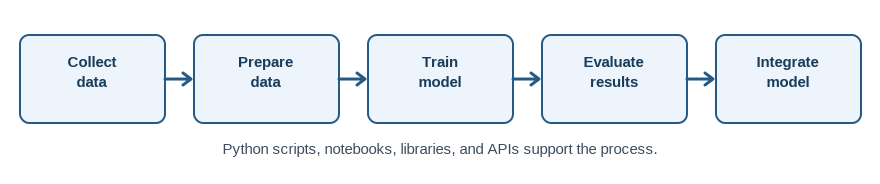
The most useful Python skills at this stage are manipulating values, organizing reusable code, loading data, and diagnosing errors. Specialized frameworks become easier once these foundations are reliable.
1. Values, variables, and basic types
A variable is a name bound to an object. Python commonly uses the following built-in types:
| Type | Example | Typical AI-related use |
|---|---|---|
int | 42 | Counts, labels, and indices |
float | 0.85 | Scores, measurements, and predictions |
bool | True | Conditions and validation flags |
str | "spam" | Text, filenames, and class names |
NoneType | None | Explicit absence of a value |
message = "Your package has arrived"
word_count = 4
spam_probability = 0.12
is_spam = spam_probability >= 0.5

print(type(spam_probability))  # <class 'float'>
print(is_spam)            # False
Python is dynamically typed: a name does not need a type declaration before assignment. Objects still have types, and operations can fail when incompatible types are used.
score_text = "0.95"
score = float(score_text)
print(score > 0.9)  # True
When working with data, distinguish a number from a string that looks like a number. This matters when loading CSV or JSON data.
2. Collections: lists, tuples, dictionaries, and sets
Collections hold multiple values. They are not interchangeable.
| Collection | Properties | Example use |
|---|---|---|
list | Ordered, mutable sequence | Examples or predictions |
tuple | Ordered, immutable sequence | Fixed dimensions or coordinates |
dict | Mapping from unique keys to values | Feature records or configuration |
set | Collection of unique elements | Distinct class names |
scores = [0.7, 0.4, 0.9]
image_size = (224, 224)
record = {"temperature": 28.5, "humidity": 0.60}
classes = {"cat", "dog", "cat"}

print(scores[0])             # 0.7
print(image_size[1])         # 224
print(record["humidity"])   # 0.6
print(classes)               # {'cat', 'dog'} (order not guaranteed)
Indexing begins at zero. A slice selects a subsequence:
values = [10, 20, 30, 40, 50]
print(values[1:4])  # [20, 30, 40]
Unlike numerical arrays, ordinary Python lists do not automatically perform elementwise mathematical operations. For example, [1, 2] + [3, 4] concatenates two lists rather than adding their corresponding elements. Numerical arrays are introduced in NumPy, Arrays, and Tensors.
3. Conditions, iteration, and comprehensions
Conditions let programs choose actions. Loops let programs repeat computations over data.
probabilities = [0.12, 0.83, 0.61, 0.24]

for probability in probabilities:
    if probability >= 0.5:
        print("positive")
    else:
        print("negative")
A list comprehension provides a concise way to construct a list from an iterable:
predicted_labels = [int(p >= 0.5) for p in probabilities]
print(predicted_labels)  # [0, 1, 1, 0]
Comprehensions are helpful for straightforward transformations. More complex transformations often deserve a named function to preserve readability.
Use enumerate() when both the position and item are needed and zip() when combining aligned sequences:
actual = [0, 1, 0]
predicted = [0, 1, 1]

for index, (truth, guess) in enumerate(zip(actual, predicted)):
    print(index, truth == guess)
This example assumes that both sequences represent corresponding observations and have equal lengths. In serious evaluation code, validate that assumption instead of silently ignoring extra elements.
4. Functions: reusable computations
A function is a named block of code that accepts inputs and may return an output. AI programs frequently use functions for preprocessing, feature extraction, evaluation, and inference.
def predict_label(probability: float, threshold: float = 0.5) -> int:
    """Return 1 when a score meets the decision threshold, otherwise 0."""
    if not 0.0 <= probability <= 1.0:
        raise ValueError("probability must be between 0 and 1")
    return int(probability >= threshold)

print(predict_label(0.72))       # 1
print(predict_label(0.72, 0.8))  # 0
The annotations float and int document intended types and can be checked by external tools; Python does not enforce them automatically at runtime.
A useful function generally has a clear purpose, explicit inputs, a meaningful return value, and predictable behavior. Avoid hiding important processing steps in unexplained global variables.
Pure functions and state
A pure function gives the same output for the same input and produces no externally observable side effects. Pure functions are easy to test and useful for deterministic preprocessing.
def center_value(value: float, mean: float) -> float:
    return value - mean
Not every AI operation is pure. Reading a file, changing model parameters during training, and sampling random values involve state or side effects. Recognizing the difference makes debugging easier.
5. Modules, packages, and environments
A module is a Python file containing definitions and statements. A package organizes related modules. An import brings names from modules into another program.
import math

print(math.sqrt(81))  # 9.0
AI projects commonly depend on external packages. Install them in an isolated virtual environment to reduce conflicts between projects:
python -m venv .venvActivate the environment using the command appropriate to your operating system or shell, then install packages:
python -m pip install numpy pandas scikit-learnOn macOS and Linux, a common activation command is source .venv/bin/activate. On Windows PowerShell, it is typically .venv\Scripts\Activate.ps1. The actual Python command may be python3 on some systems.
For a reproducible project, record and manage dependencies, and use a supported Python version compatible with the chosen libraries. A notebook that runs only on one person’s machine is not a dependable engineering artifact.
6. Exceptions and debugging
An exception signals an error or exceptional condition during execution. Use exceptions to handle anticipated failures, such as an invalid number in a data file.
def parse_measurement(raw_value: str) -> float | None:
    try:
        return float(raw_value)
    except ValueError:
        return None

print(parse_measurement("12.5"))  # 12.5
print(parse_measurement("unknown"))  # None
This code uses Python 3.10 or later for the float | None annotation.
Do not catch every exception and silently continue. That can hide broken assumptions, corrupt data, and make an AI system appear to work when its inputs are invalid. Prefer descriptive errors, logging, tests, and explicit handling of missing values.
7. Reading and writing data
AI work often begins with structured records or text files. Python’s standard library can handle simple CSV and JSON files.
import csv

with open("measurements.csv", newline="", encoding="utf-8") as file:
    rows = list(csv.DictReader(file))

print(rows[:2])
csv.DictReader returns field values as strings, so values intended to be numbers may need conversion and validation. The example assumes measurements.csv exists and has a header row.
For JSON:
import json

settings = {"threshold": 0.5, "model": "baseline"}
with open("settings.json", "w", encoding="utf-8") as file:
    json.dump(settings, file, indent=2)
For large, tabular datasets, Pandas provides convenient operations for missing values, filtering, grouping, and joins. See Data Analysis with Pandas and SQL.
8. A small AI-related program without an ML library
Before using a machine-learning framework, it is worth implementing a simple predictive rule. This example uses a fixed score based on words present in a message. It is a handwritten rule-based classifier, not a model learned from examples.
SUSPICIOUS_WORDS = {"prize", "winner", "claim", "free"}


def classify_message(message: str) -> str:
    words = set(message.lower().split())
    matches = len(words & SUSPICIOUS_WORDS)
    return "flagged" if matches >= 2 else "not flagged"


print(classify_message("Claim your free prize"))  # flagged
print(classify_message("Meeting at noon"))        # not flagged
The program demonstrates string processing, sets, functions, and a decision rule. It also demonstrates a limitation: punctuation and variations in wording can defeat simplistic tokenization, while harmless messages can contain the same words. Real spam detection normally requires careful data collection, evaluation, and more robust modeling. For the conceptual distinction, read Symbolic AI and Learning-Based AI.
9. A first learning-based model with scikit-learn
Now consider a model whose parameters are learned from examples. The following code uses a tiny synthetic dataset of two numerical features and a binary label. It is designed to demonstrate the software workflow, not to establish real-world predictive performance.
from sklearn.linear_model import LogisticRegression

# Rows are observations; columns are numerical input features.
X_train = [
    [0.1, 0.2],
    [0.2, 0.1],
    [0.3, 0.4],
    [0.8, 0.7],
    [0.9, 0.8],
    [0.7, 0.9],
]
y_train = [0, 0, 0, 1, 1, 1]

model = LogisticRegression(random_state=42)
model.fit(X_train, y_train)

new_examples = [[0.15, 0.25], [0.85, 0.75]]
predictions = model.predict(new_examples)
probabilities = model.predict_proba(new_examples)

print("Predicted labels:", predictions.tolist())
print("Class probabilities:", probabilities.round(3).tolist())
The key stages are:
- Represent examples: Each row of
X_traincontains two input features. - Supply labels:
y_traincontains the desired class for each training example. - Train:
fit()estimates model parameters from the labeled data. - Infer:
predict()uses the trained model to choose class labels for new examples. - Inspect uncertainty:
predict_proba()returns estimated probabilities associated with the possible classes.
The output probabilities are model estimates, not guarantees of correctness. Evaluating performance requires separate, representative data that was not used to fit the model. The next conceptual steps are Data Splitting, Labeling, and Leakage and Model Evaluation Metrics.
What the example does not establish
A dataset of six synthetic examples is not enough to judge generalization, robustness, fairness, or production readiness. A successful fit() call simply shows that the algorithm ran on the supplied data. This distinction between a working program and a validated AI system is fundamental.
10. Python lists, NumPy arrays, and tensors
AI code frequently stores numbers in multidimensional structures:
- A Python list is a general-purpose container.
- A NumPy array is a numerical structure optimized for array operations.
- A tensor is a multidimensional numerical object, often with additional capabilities such as automatic differentiation and accelerator support in a framework such as PyTorch.
import numpy as np

features = np.array([[1.0, 2.0], [3.0, 4.0]])
weights = np.array([0.5, -0.25])

scores = features @ weights
print(scores)  # [0.  0.5]
Here, @ performs matrix-vector multiplication, producing one score per row. Understanding shapes is essential: a two-dimensional array of shape (2, 2) is not interchangeable with every other array that happens to contain four numbers. Review Vectors and Matrices and Vector and Matrix Operations before moving into tensor-based model training.
11. Organizing a small AI project
Even an introductory project benefits from a basic separation of concerns:
ai-project/
  README.md
  requirements.txt
  data/
  src/
    prepare_data.py
    train.py
    predict.py
  tests/
    test_preprocessing.py
Keep data preparation, training, and prediction code logically separate. Record how the dataset was obtained and how it was split. Never include API keys or private credentials in source files. For more complete workflows, use version control and experiment tracking so the results can be reproduced.
Notebooks are valuable for exploration, but code that needs to be reused or tested often belongs in ordinary Python modules. See AI Development Tools: Git, Jupyter, and APIs.
12. Common mistakes to avoid
Confusing Python proficiency with AI understanding. Knowing syntax is necessary but does not explain what a model learns, how it generalizes, or when its output is reliable.
Using Python lists like numerical arrays. List operations do not have the same mathematical semantics as NumPy operations. Check data types and array shapes.
Treating training accuracy as final performance. A model may perform well on the data it has already seen and fail on new observations.
Ignoring data validation. Missing values, wrong units, and string-encoded numbers can change model behavior or cause failures.
Failing to control randomness. Random seeds can help reproduce experiments, but identical results may still depend on library versions, hardware, and nondeterministic operations.
Copying code without understanding the inputs and outputs. At minimum, inspect the types, shapes, assumptions, and failure modes of each operation.
Practice exercises
- Write a function that converts a list of probability scores into binary labels using a configurable threshold.
- Store three observations in a list of dictionaries. Extract a list containing only one numeric feature.
- Explain why
"12" + "3"differs from12 + 3. - Use NumPy to compute the dot product of two vectors with three elements each.
- Modify the scikit-learn example to predict on a third observation. Explain why the predicted label alone does not measure model accuracy.
- Identify which parts of the handwritten message classifier are rules and which parts of the logistic-regression example are learned from data.
Show sample answers and checks
def labels(scores, threshold=0.5): return [int(score >= threshold) for score in scores]records = [{"x": 1}, {"x": 2}, {"x": 3}]; values = [item["x"] for item in records]- The first expression concatenates strings into
"123"; the second adds integers to produce15. np.dot(np.array([1, 2, 3]), np.array([4, 5, 6]))evaluates to32.model.predict([[0.5, 0.5]])produces a class, but accuracy requires ground-truth labels for a suitable evaluation dataset.- The message classifier applies a manually chosen vocabulary and threshold; logistic regression estimates numerical coefficients from labeled examples during
fit().
Related concepts
- AI Knowledge Map places programming within the overall AI learning sequence.
- AI Systems, Models, Training, and Inference explains how learning and prediction fit into an AI system.
- NumPy, Arrays, and Tensors extends Python foundations to numerical computation.
- Data Analysis with Pandas and SQL covers working with real datasets.
- AI Development Tools: Git, Jupyter, and APIs introduces practical development workflows.
- Data Cleaning and Preprocessing explains how raw data is transformed before modeling.
- Linear and Logistic Regression develops the machine-learning method used in the first trained-model example.
References and further reading
- Python Tutorial, Python documentation — core syntax, data structures, functions, modules, and errors.
- Python
venvdocumentation — isolated project environments. - NumPy: Absolute beginners — numerical arrays and operations.
- scikit-learn: Getting Started — fitting models and making predictions.
- Google Machine Learning Crash Course — broader connections between data, model training, and evaluation.
Related articles in
- AI Agents and Tool-Using Workflows — Learn agent goals, tool invocation, planning, state, permissions, and how to evaluate multi-step AI workflows.
- AI Development Tools: Git, Jupyter, and APIs — Learn how Git, Jupyter notebooks, Python environments, and APIs fit together in reproducible, secure artificial intelligence workflows.
- How AI Is Changing Theoretical Computer Science — AI is beginning to help researchers explore algorithms, mathematical structures, and formal proofs. Here is what it can do, what still needs human judgment, and why verification matters.