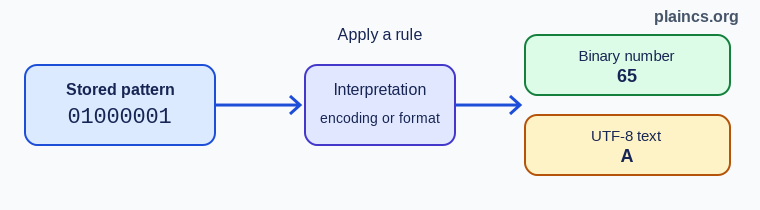
The same storage device can hold a letter, a song, and a spreadsheet. It does not need a separate kind of physical mark for each. It stores patterns, and software interprets those patterns according to agreed rules.
2.1 Bits, bytes, and size
A bit has two possible values, written 0 and 1. Real hardware uses physical states to represent them. Eight bits make a byte. A byte can express 256 distinct patterns, from 00000000 to 11111111. The pattern 00000011 can be read as the number three in ordinary binary counting. The same eight marks could mean something else under another rule. The pattern alone is not its meaning.
Storage capacity is commonly given in bytes: a file may be 4 MB. Transfer speed is often given in bits per second: an internet connection may be described in Mbps. Because one byte contains eight bits, 8 megabits are roughly 1 megabyte before network overhead and differences in unit conventions. Some labels use decimal units, where kilo means 1,000; operating systems may use binary units, where a kibibyte means 1,024 bytes. Always check the unit when comparing sizes.
Try it. A 2 MB file will not reliably arrive in two seconds on an 8 Mbps connection. The rough ideal time is two seconds, but protocol overhead, shared bandwidth, and delays add time. Explain which number described size and which described rate.
Check. Are MB and Mb interchangeable? Answer: No. Capital B usually means bytes; lowercase b means bits. Context and the provider’s unit definition matter too.
2.2 How text and numbers are stored
To store text, software maps characters to numbers using a character encoding. Unicode assigns identities to characters from many writing systems. UTF-8 is a common way to encode those characters as bytes. Some characters take more bytes than others. A character on screen is not always one byte, and a visible symbol may be made from several Unicode code points.
Numbers need conventions too. A file containing the text 12 stores characters representing a one and a two; a calculation may store the numeric value twelve in a different internal form. That difference explains why adding two spreadsheet cells can fail when one cell contains text that merely looks like a number.
Some decimal fractions cannot be stored exactly in common binary floating-point formats. A computer may therefore show a result close to 0.3 when adding 0.1 and 0.2, with a tiny extra fraction. This is a representation limit, not evidence that arithmetic has changed. For money, programs often use integer minor units or decimal arithmetic designed for that purpose.
Check. If a file contains a dollar sign followed by 12, is it automatically a numeric value? Answer: No. It may be text. The format and program decide how to interpret it.
2.3 Pictures, sound, and video as data
A raster image is a grid of pixels. Each pixel carries color information. More pixels can preserve more detail, but they also usually require more data. A 100-by-100 image has 10,000 pixel positions. A 1,000-by-1,000 image has one million: one hundred times as many positions, before compression. Enlarging a small raster image does not create detail that was never captured.
An SVG image works differently. It describes shapes, lines, text, and their positions. A simple diagram can stay sharp at many display sizes. Photographs, with their many irregular details, are usually better represented as raster images. This is why a course diagram and a camera photo often use different file formats.
Digital audio stores measurements of a changing sound wave taken at regular intervals, called samples. Video combines a sequence of frames with sound. Higher resolution, more frames, more channels, or a longer recording can increase file size, though compression changes the actual result.
Worked example. A diagram made of three boxes may be smaller and clearer as SVG. A sunset photo is usually better as JPEG or another raster format. File extension alone does not tell you whether the image is suitable; consider its content and intended use.
2.4 Formats, compression, and metadata
A file format specifies how stored data is organized. The software opening a file needs to understand that format. Compression represents the same material in fewer bytes. Lossless compression lets you reconstruct the original data exactly. Lossy compression discards some information to make a file smaller. A compressed photo may look nearly unchanged at normal size yet lose fine detail when enlarged or edited repeatedly.
Metadata is data about data: a photo can include a capture time, device details, and perhaps location. This can help you organize files, but it can also reveal information you did not mean to share. Check export settings when location privacy matters. Compression is not encryption. A compressed file is smaller; an encrypted file is intended to be unreadable without the key.
Module activity. Compare a fictional 1 MB diagram, 5 MB photograph, and 50 MB video. For each, explain what information it carries, one reason for its size, whether lossless or lossy compression could suit its use, and what metadata you would check before sharing.
Check. Does a smaller file always mean lower quality? Answer: No. A format may encode the same information more efficiently. Lossy compression can reduce quality, but size alone cannot tell you how much useful detail remains.
Next we will look at the hardware that reads these patterns and does work with them.