Open a saved document. It appears on screen in a moment. You can change a sentence, then save it. Those simple actions involve several components, and each has a different job.
3.1 The processor follows instructions
The central processing unit, or CPU, carries out instructions. In a simplified account, it fetches an instruction, interprets it, executes it, and moves on. A modern processor is far more elaborate, and may work on several instructions at once, but the basic idea is enough here: software does not act by magic. Physical circuits perform operations specified by instructions.
The CPU keeps some values in tiny, very fast places called registers. A cache keeps other recently or frequently needed data close to the processor. Main memory holds much more, but accessing it is usually slower. This arrangement is like keeping the page you are reading in front of you while the rest of a book sits nearby. The analogy stops at the mechanism: a processor uses electrical circuits and exact addressing, not human attention.
Check. Does a faster CPU make every task faster? Answer: No. Some tasks wait mainly for storage, a network, or a person. Speed depends on the work and on the slowest relevant part.
3.2 Memory and storage do different jobs
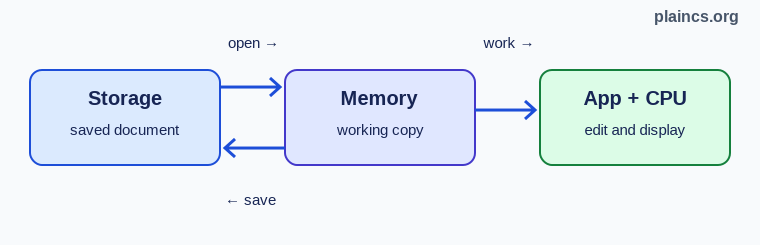
RAM is working memory. Programs and data currently in use are placed there. Storage, such as an SSD or hard drive, keeps files and programs across normal shutdowns. When you open a document, the system reads its saved data from storage into memory. Your edits exist in the running program’s state; saving writes the changed document back to storage. An app may also save automatically, but you should not assume that every app does so in the same way.
Ordinary RAM loses its contents when power goes away. Storage is meant to persist. This is why saving matters. More RAM can help when many programs compete for working space, but it does not create more long-term file capacity. If memory is tight, an operating system may move some data to storage temporarily. The computer can keep working, but this can feel slow.
Worked example. A learner has 8 GB of RAM and a nearly full 256 GB SSD. Adding more RAM may help several open apps run together. Freeing storage may help save files and install updates. They solve different shortages.
Check. Will closing an app delete its saved document? Answer: Usually no. Closing ends the running process; deleting a file is another action. Unsaved edits may be lost, so confirm that the latest version was saved.
3.3 Components work together
The processor, memory, and storage connect through a board and communication paths. Input devices, such as a keyboard or camera, supply data. Output devices, such as a display or speaker, present results. Power and cooling also matter: circuits need electrical energy and produce heat.
A graphics processing unit, or GPU, is built for many similar calculations in parallel. It helps draw graphics and can speed some other workloads, including parts of AI processing. A GPU is not a universal replacement for a CPU; software must use the kind of work it handles well. Many phones and laptops combine several functions in a compact chip. The roles still exist even when you cannot point to a separate part.
Try it. Trace a video call. Camera and microphone provide input; software processes it; memory holds current data; a network sends and receives it; the display and speaker provide output. Identify a different symptom for a faulty camera, low memory, and a weak connection.
3.4 What makes a computer feel fast or slow?
Performance depends on the workload. Opening a large photo might wait for storage and image processing. A video call may depend on network delay. A calculation may depend on processor speed. The component that limits progress is a bottleneck. Improving something else may have little effect.
Processor core count matters when work can be divided. Memory capacity matters when programs need room to run. An SSD can make file access feel quicker than a hard drive. Heat can make a device slow down to protect itself. These facts explain why one number on a product label cannot predict every experience.
Module activity. Compare three fictional needs: writing documents, editing large photos, and joining video calls. For each, name two components or conditions likely to matter and one specification that would not answer the whole question. Do not choose a product from a single number.
Check. A video call freezes while the local document editor works normally. Does buying more storage clearly solve the problem? Answer: No. First check the connection, call service, and device load. More free storage may help a very full system, but the symptom alone does not identify it as the cause.
The next module looks at the software that shares the machine among programs and people.