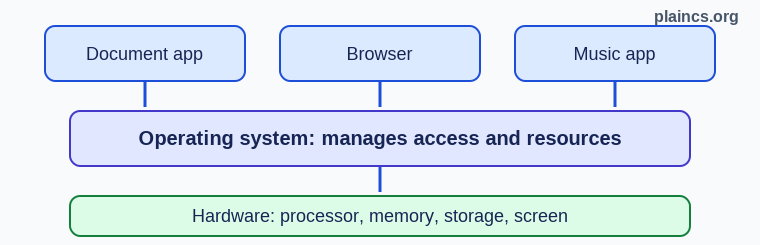
You can play music while writing a note and receiving a message. The hardware does not decide on its own which program gets the screen, memory, or network. An operating system coordinates those requests.
4.1 What does an operating system do?
Windows, macOS, Linux, Android, and iOS are operating systems. They differ in design, but all help programs use hardware and provide common services: reading files, drawing to a screen, managing memory, connecting to networks, and controlling access. The kernel is a central part that manages low-level resources. The full operating system also includes many other pieces you interact with.
Suppose a photo app wants to read an image. It asks the operating system for the file. The system locates the data and checks whether the app is allowed to read it. The app usually does not need to know the exact electrical commands for the storage device. This separation makes software easier to write and lets several programs share one machine.
Check. Is a browser an operating system? Answer: Usually no. It is an application running on an operating system, though it can host other applications inside web pages.
4.2 A program on disk and a running process
An installed program is stored on disk. When you start it, the operating system loads what it needs and creates a process: a running instance with memory and other resources. You can sometimes start two instances of the same program; they are separate processes. Background services are processes too, even if they have no visible window.
The operating system gives processes time on the processor. With one processor core, it can switch among them quickly; with multiple cores, some can run at the same time. What looks like continuous multitasking may be a mixture of switching and parallel work. A system monitor can show which processes use processor time and memory. Observe only; do not end processes you do not recognize.
Worked example. A document editor is closed, but the document remains on storage. Opening it again creates a new process and reads the saved file. If the last changes were never saved, the new process may not have them.
4.3 Permissions, installations, and updates
Programs need different levels of access. A calculator rarely needs your camera. A video meeting app may need both camera and microphone. A permission request is a chance to ask whether the access fits the task. Some actions require administrative rights because they can affect the whole device or other users. Give such rights only to software and actions you understand and trust.
Install software from sources you can verify. Updates may fix defects, improve compatibility, or close security weaknesses. An update can also change behavior, so important work should be saved and backed up before major changes. A driver is software that helps the operating system communicate with a device; you do not need to manage drivers for every ordinary task, but they explain why hardware may need specific support.
Check. Does a familiar-looking app icon prove a download is safe? Answer: No. Check the actual source and publisher, and be cautious with unexpected links. Appearance is easy to copy.
4.4 Interfaces for giving instructions
A graphical interface lets you click, tap, and drag. A command line lets you type commands. Both are ways to ask software to do work. A command often has a name and arguments. A working directory is the folder from which a command is interpreted; a relative path depends on that location. You can learn these ideas without typing a destructive command.
For example, imagine a terminal that starts in Courses. The path Computing/notes.txt refers to a file inside the Computing folder. If you start in a different folder, the same relative path may point somewhere else or nowhere at all. An absolute path names a location from a fixed starting point, though its exact form differs across systems.
Some programming languages are commonly compiled into a form a machine can run; others are commonly run through an interpreter. Real language implementations vary. What matters here is that source code must be translated or interpreted into operations the hardware can carry out.
Module activity. Trace these actions: open a saved document, change a sentence, save, close the editor, and reopen. For each action, say what happens to the process, memory, and saved file. If you use a cloud editor, add where the network may be involved.
Check. A process disappears from the system monitor. Was its document deleted? Answer: No conclusion follows. The process stopped. The saved file may still be present; unsaved changes depend on the app’s save behavior.
Next, we will follow data beyond one device.