When a page opens, it can feel as if the information was already inside your phone. Often it has just travelled through several networks. Following that journey helps you diagnose failures and make better choices about what you share.
5.1 Connecting devices
A network lets devices exchange information. A cable can carry data directly. Wi-Fi uses radio waves between your device and a nearby access point. A home router moves traffic between your local network and your internet provider’s network. The provider connects you onward to other networks. “The internet” is this large system of connected networks, not a single company or machine.
Being connected to Wi-Fi proves only that your device has joined a nearby wireless network. The router may have lost its connection to the provider. The provider may be working while one website is down. Distinguishing those cases saves time: try a second site, then a second device on the same network. Record what works before changing settings.
Check. Your phone shows a strong Wi-Fi signal but no website loads. Is the signal display wrong? Answer: Not necessarily. The local wireless link may be strong while the connection beyond the router is unavailable.
5.2 Addresses, packets, and protocols
To deliver information, network devices need addresses. An IP address identifies a network destination for routing. A device can have a local address used inside one network and appear through a public address when communicating outside it. IPv4 and IPv6 are two versions of the addressing system. You do not need to calculate their ranges to understand their role.
Data is usually divided into packets. Each packet carries information that helps it reach a destination and be handled there. Packets may take different routes. Communication also needs protocols: agreed rules about what messages mean and how systems respond. Sending a page is not like mailing one sealed envelope in a straight line. It involves many small exchanges and checks.
Worked example. You send a short message. The app prepares data; the operating system and network equipment send packets toward a service; that service may store the message and forward it to another person. The message might be encrypted in transit, but its storage and access rules depend on the service. A network address alone does not tell you who the other person is.
5.3 What happens when you open a website?
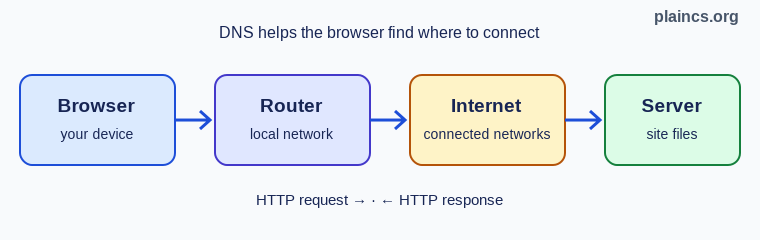
You enter a URL, the address of a resource. A name such as example.org is easier to remember than an IP address, so the browser uses DNS, a naming service, to find where to connect. It then sends an HTTP request to a server. The server sends an HTTP response with a status and content. The browser reads the response and renders the page. A page can request other files, such as styles, images, and scripts, so one visible page may require many exchanges.
HTTPS protects the connection between your browser and the site you reached, making interception and alteration harder. It does not prove that the site’s claims are true or that a shop will treat you fairly. A convincing fake site can also use HTTPS. Check the domain and the reason for a request before entering important information.
Check. DNS fails, but a messaging app still works. Is the whole internet unavailable? Answer: Not necessarily. Some services may use already known addresses or different naming paths. The symptoms point to a narrower problem than total network loss.
5.4 The cloud is still computers
An online document lives on storage managed by a service, on computers in data centers. The service may make several copies and share computing capacity among customers. “Cloud” describes how you use the service; it does not make its data independent of hardware, accounts, networks, or outages.
Latency is delay before a response; bandwidth is how much data can move over time. A call can feel laggy because of latency even when a speed test reports high bandwidth. Synchronization keeps versions on devices aligned. A mistake or deletion may also be synchronized. A backup is a separate copy kept so you can recover an earlier usable state. Some services provide version history, but check its limits before depending on it.
Module activity. Draw a fictional document upload from laptop to service. Mark the point where data leaves the laptop, where an account is checked, and where a copy might remain. Then explain what you could still do if the connection fails.
Check. A file appears on both your phone and laptop. Do you necessarily have a backup? Answer: No. They may be synchronized copies that share the same deletion history. A recovery plan needs a separate copy or verified version history.
We now know enough about accounts and networks to discuss everyday protection.