A program that calculates a total is useful. A service other people can use needs more: a clear interface, understandable errors, storage rules, tests, and a way to release changes. None of these appears automatically when the code runs on one developer’s computer.
10.1 From a user need to a feature
“Make it easier to track reading” does not yet tell a team what to build. A more useful request is: “A reader can enter the date, book title, and minutes for a session and see a monthly total.” Now we can ask what happens with a blank title, a negative duration, or a date in the wrong format. We can also ask how a keyboard user reaches each field and how an error is announced to someone using assistive technology.
An acceptance check describes something observable. For example: “Given two sessions of 20 and 35 minutes in October, the October total displays 55.” Another check might say that a negative duration produces a clear message next to the field and does not save the record. A third might say that every form control has a visible label and can be reached by keyboard. These checks turn a vague feature into behavior people can review.
Check. Is “make the form intuitive” an adequate acceptance check? Answer: No. It names a goal but not what a reviewer should observe. Specify the task, the expected result, and how people with different access needs can complete it.
10.2 The parts of a web application
The browser interface shows information and accepts input. HTML gives content its structure; CSS controls presentation; JavaScript can respond to actions in the browser. A server may apply rules, check permissions, and work with stored data. A database may keep records between visits. Some sites are mostly static: pages are prepared in advance. Others generate responses from current data. A product can mix both approaches.
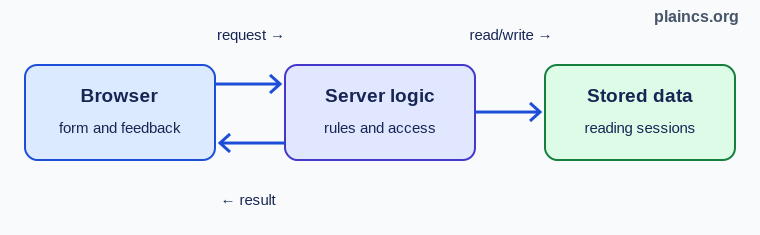
Imagine adding a reading session. The form collects values. The browser sends them to a server. The server checks the input and the user’s permission, writes the valid record, and returns a result. The browser displays success or an error. A visually correct form is not enough if the server accepts negative minutes or lets one person alter another person’s data.
Check. Can a page displayed in a browser be useful without a database? Answer: Yes. A static guide or a small calculator can work without storing user records. Choose the parts that match the task.
10.3 How applications talk through APIs
An application programming interface, or API, defines how one piece of software asks another for work. A web API often has an endpoint, such as a path for reading sessions, and uses a format such as JSON. A request might say “add this session”; a response might return the new identifier or an explanation of why the request was refused.
The server must validate the input even if the browser already checked it. Browser checks make errors easier to fix, but clients can be bypassed or malfunction. The server also needs to check authorization: being logged in does not mean a user may read or change every record. Response codes and messages should help the client distinguish success, invalid input, and unavailable service without exposing private system details.
Worked example. The browser sends { "title": "River Book", "minutes": -5 }. The server should reject the negative duration under our rule and explain the problem. It should not store the row merely because the JSON is well formed. Syntax validity and business validity are separate.
10.4 Making and maintaining changes
Saving a file changes a local copy. Version control records related changes so a team can review them and return to an earlier state. A commit records a snapshot in a repository; pushing sends commits to a remote repository. Deployment puts a version where users can reach it. These are separate steps. A successful local test does not prove that the live service received the change.
Tests help catch regressions. Review by another person may find unclear behavior or missing cases. A deployment plan should say how to check the released version and how to roll back if it fails. Maintenance includes updates, backups, monitoring, and support for users. Software also has a licence that sets rules for use and redistribution. “Open source” means source code is available under a licence; it does not mean every use is automatically permitted or that a service will be maintained forever.
Module activity. Write a three-sentence feature request for the reading log, then three acceptance checks: a normal entry, a rejected entry, and a keyboard-accessible way to correct the error. Draw where the browser, server, and stored data would be. A paper design is enough.
Check. A developer changed a file and sees it locally. Can users see the change? Answer: Not from that fact alone. It must be committed or otherwise prepared, sent where needed, deployed, and checked in the environment users reach.
Next we will look at a kind of software whose output is often useful but requires particular care in checking.